 CRMAI Docs
Setting & Escalation
Purpose
The Setting tab covers operational toggles for how the agent behaves in day-to-day conversations, plus a full Escalation configuration section for handing conversations off to a human.
Behavior toggles
Setting | Description |
|---|---|
Typing Simulation | If enabled, the typing indicator appears before the agent responds. |
Passive Mode | If enabled, the AI Agent replies only if no manual response is detected after a timeout. |
Group Chat Replies | If enabled, the AI Agent replies to messages in WhatsApp groups. |
Stop reply if manual CS responds | If enabled, the AI Agent ignores replies from a number after manual CS replies — prevents the AI from talking over a human agent. |
Multi-bubble | If enabled, long responses are split into separate message bubbles. |
Conversation History Reading | Slider, 10–50. Max history length the AI Agent will read. |
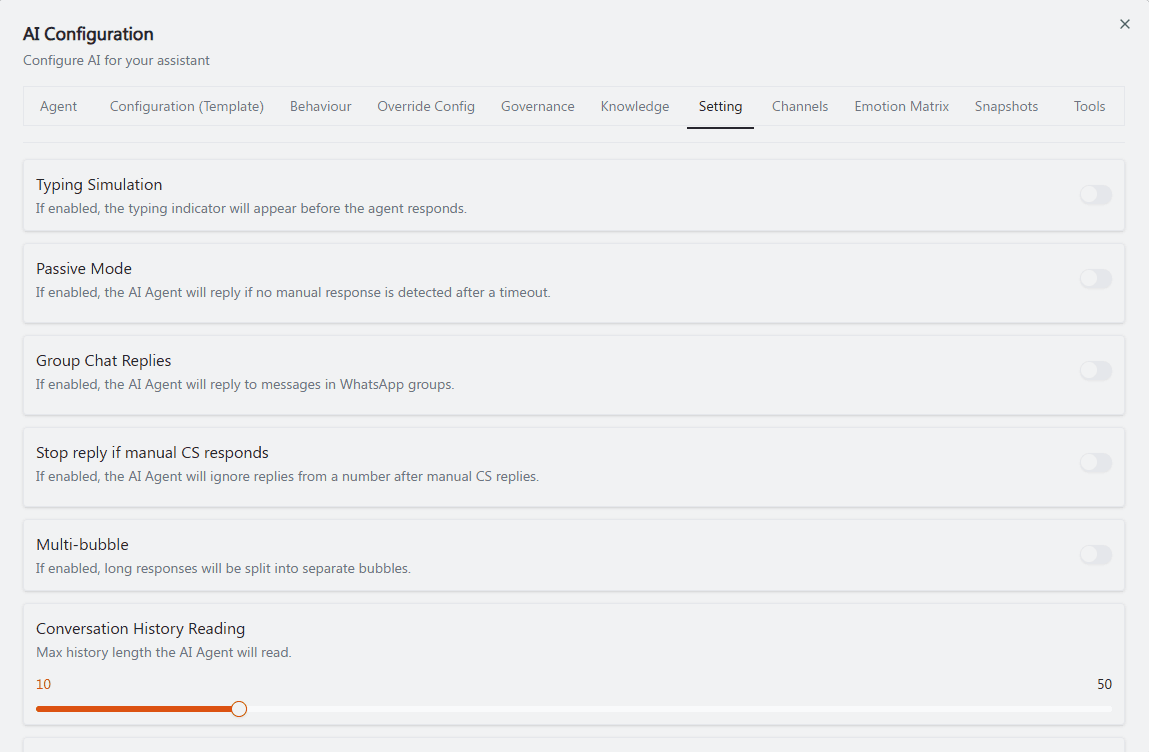
Recommended annotation: ①–⑤ number each toggle top to bottom in the exact order of the table above, ⑥ box the Conversation History Reading slider at the bottom. Keep numbering strictly top-to-bottom since there's no other logical grouping among these six.
Escalation
"Configure human handoff and confidence-based escalation."
Handoff prompt — "Prompt used when the AI needs to hand the conversation off." Free text: "Describe when and how the AI should hand off the conversation."
Escalation recipients — "Select one or more customer identities to receive escalation notifications." Use + Add recipient to build the list.
Human handoff (toggle) — "Enable human handoff when the user needs to be connected to a human."
Confidence escalation (toggle) — "Enable human escalation when the AI confidence is below the threshold."
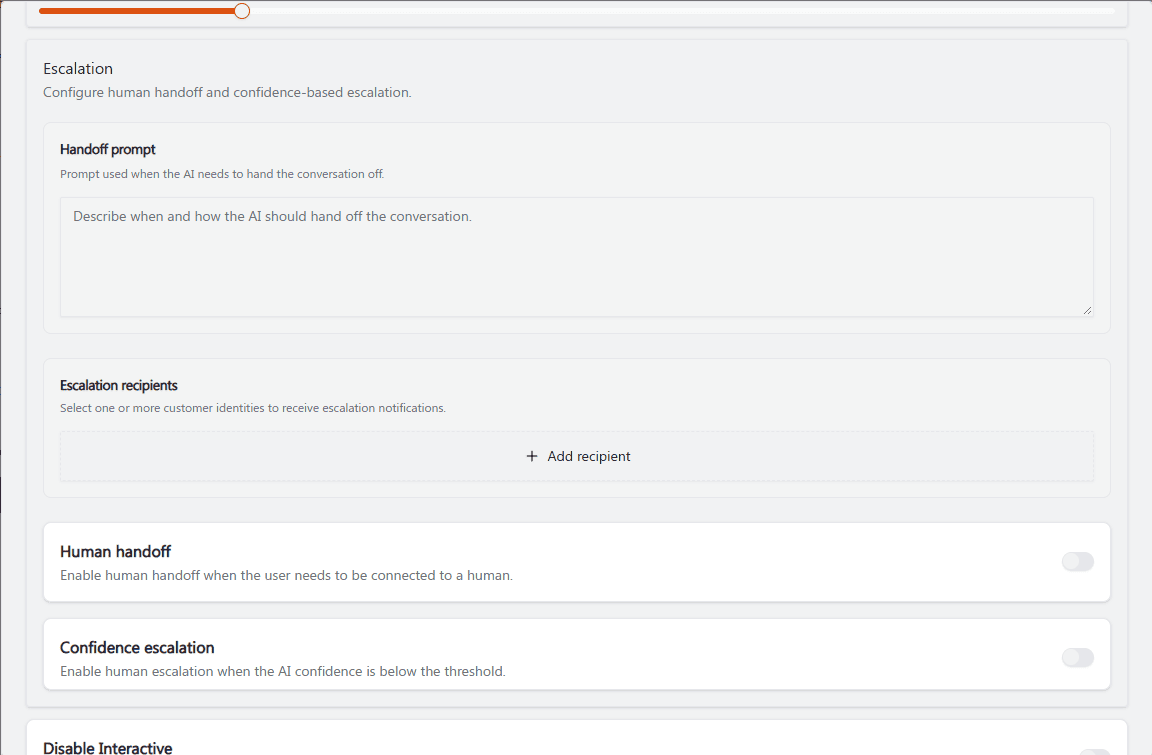
Recommended annotation: ① box the Handoff prompt textarea with the example text filled in. ② arrow to + Add recipient. ③④ number the two toggles at the bottom (Human handoff, Confidence escalation) — these two are easy to confuse, so a side-by-side bracket noting "③ connects to a human" vs "④ triggers on low AI confidence" helps disambiguate.
Additional escalation-related toggles
Disable Interactive — "By default, the AI will try to send interactive messages. Turn this on to disable interactive responses." See Interactive Message.
Allow Smart Form Tool — "By default, the AI cannot access published Smart Forms. Turn this on to let the AI use published Smart Forms." See SmartForms.
Opening Hours — "If enabled, the AI Agent will automatically activate during business hours."
Follow Up — "When enabled, the agent will automatically perform follow-up actions based on the defined conditions and events."
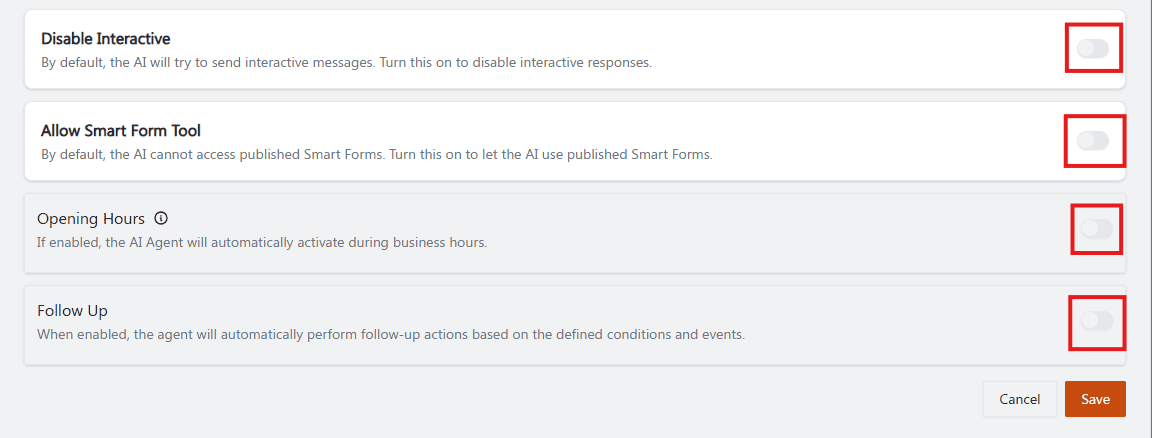
Recommended annotation: ①②③④ number the four toggles top to bottom, and for ① Disable Interactive add a small note "⚠️ inverted logic — ON means interactive is OFF" directly next to it, since the double-negative naming is the single most likely point of confusion on this page.
Operational guidance
Write a clear Handoff prompt even if Human handoff is off for now — it costs nothing and makes turning it on later straightforward.
Pair Confidence escalation with a conservative Governance Autonomy Level for any agent handling sensitive topics.
Turn on Stop reply if manual CS responds for any agent working alongside human operators in Shared Inbox — this avoids the AI and a human agent replying to the same customer at the same time.
Only enable Allow Smart Form Tool if the agent's role genuinely involves collecting structured data from customers.
Related: Behaviour: Agent Personality · Governance & Autonomy · SmartForms · Interactive Message