 CRMAI Docs
Governance & Autonomy
Purpose
"Set the level of autonomy, decision scope, and memory limits for this AI agent." This is the primary control for how independently the agent is allowed to act.
Controls
Control | Range | What it does |
|---|---|---|
Autonomy Level | Slider (example shown: 5) | The level of independence of the agent. Level < 3 will always suggest human handoff. |
Decision Scope Level | Slider (example shown: 5) | How broadly the agent can make decisions outside strict instructions. |
Authority Limit Level | Slider (example shown: 3) | Caps max output tokens = level × 1000. This also gates which Tools the agent can access — see Agent Tools. |
Memory Depth Limit | Number, 1–50 (example: 10) | Maximum number of history messages read by AI. |
Context Retention Days | Number, 1–365 (example: 30) | How many days conversation context is kept in the agent memory. |
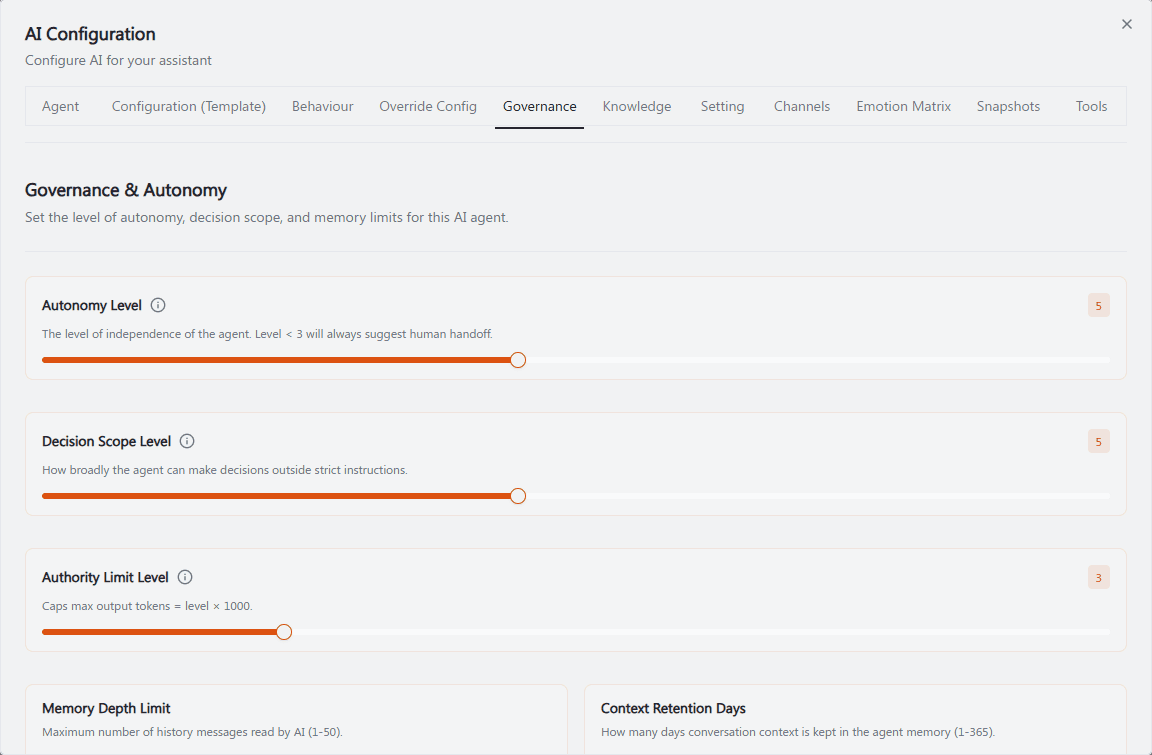
Recommended annotation: ①②③ number the three sliders top to bottom (Autonomy Level, Decision Scope Level, Authority Limit Level) and add a small red flag callout on Autonomy Level reading "< 3 = always suggests human handoff" directly on the slider's low end. ④⑤ number the two number fields (Memory Depth Limit, Context Retention Days). Add a dotted line connecting ③ Authority Limit Level to an off-screen note "→ also gates Tools tab" since that cross-tab relationship is easy to miss.
How Authority Limit Level gates Tools
Each tool in the Agent Tools tab has a required level (e.g., Tag Customer requires Level 4, Route Ticket requires Level 7). If the agent's Authority Limit Level is below a tool's required level, that tool shows as NOT ACCESSIBLE and cannot be enabled — even if you try to toggle it on. Raise the Authority Limit Level here first, then go enable the tool.
Operational guidance
Start new agents with a low Autonomy Level (below 3) so they default to suggesting human handoff, then raise it gradually as you build confidence in the agent's responses.
Authority Limit Level directly caps response length (level × 1000 tokens) and which tools are usable — raising it for the sake of unlocking a tool will also raise the max response length, so review both effects together.
Keep Context Retention Days aligned with your data retention/privacy policy — don't retain conversation context longer than necessary.
A high Decision Scope Level with a high Autonomy Level means the agent can take significant independent action — pair this with strong Emotion Matrix and Setting & Escalation rules so it still escalates appropriately when needed.
Related: Agent Tools · Setting & Escalation · Override Config