 CRMAI Docs
Model Profiles & Configuration Templates
How this fits together
There are two related concepts, managed in two different places:
Model Profiles and Configuration Templates are created and managed centrally under the Configuration library tab on the AI Agent list page.
Each individual agent then selects one of each on its Configuration (Template) tab inside AI Configuration (see AI Agent).
Configuration library
On the AI Agent page, switch from the Agents tab to the Configuration library tab. This shows two side-by-side panels:
Model profiles — "Manage the reusable model provider and generation defaults." Table columns: Name, Model, Provider, Actions. New profile button to create one.
Config templates — "Store reusable behavior, language, and style defaults." Table columns: Name, Archetype, Language, Actions. New template button to create one.
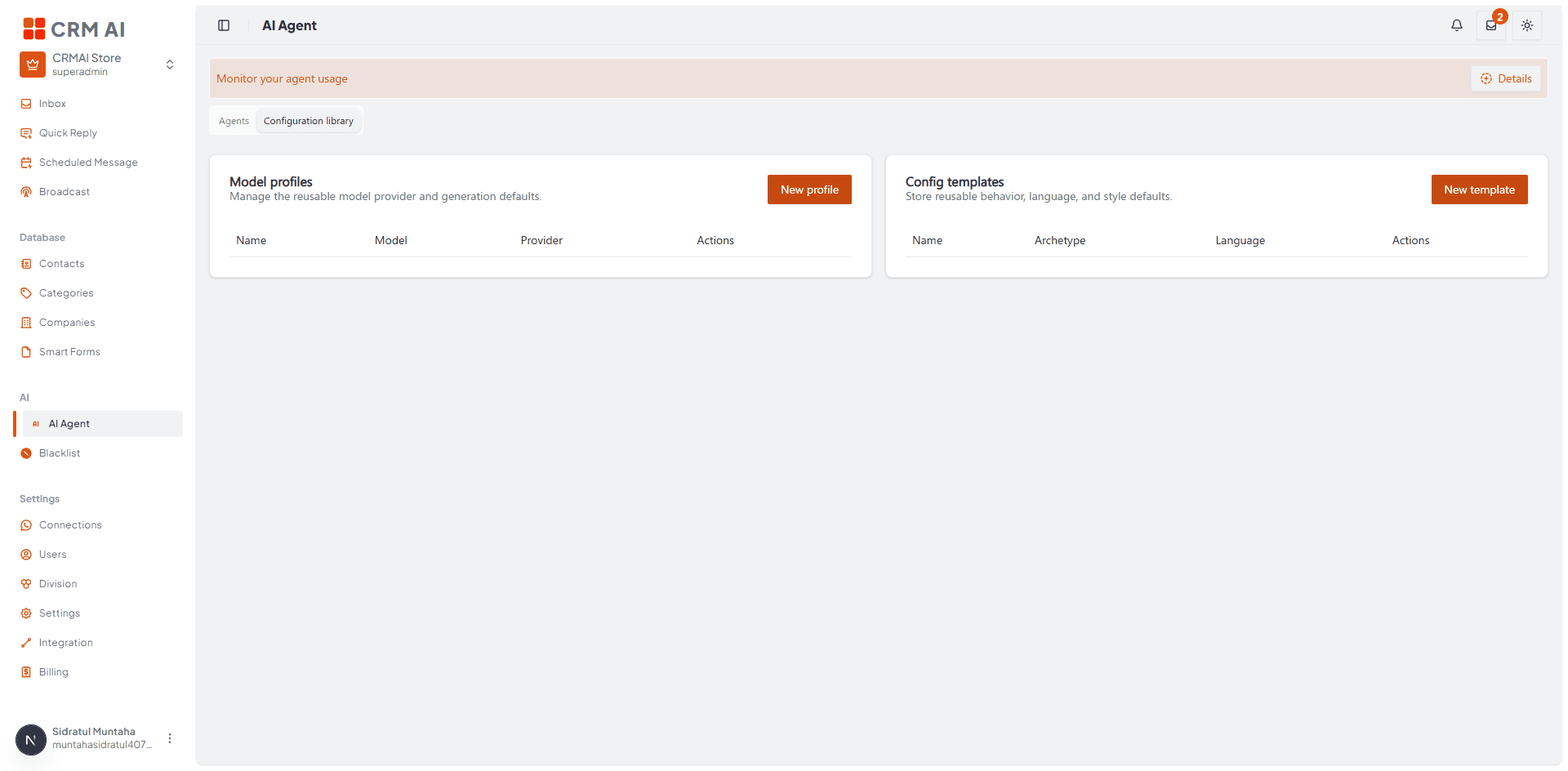
Recommended annotation: ① arrow to the Configuration library tab itself (top, to show how to get here from Agents). ② box the New profile button on the left panel. ③ box the New template button on the right panel.
Creating a Model Profile
Click New profile to open Create model profile:
Field | Description | Example shown |
|---|---|---|
Name | Profile display name. | — |
Provider | The LLM provider. |
|
Model name | Which model to use. |
|
Model version lock | Pin to a specific model version. |
|
Temperature | Response randomness. Some models only support a fixed value — the UI shows a note like "This model only supports the default temperature value of 1." when that applies. |
|
Top P | Nucleus sampling parameter. |
|
Frequency penalty | Reduces repetition of the same tokens. |
|
Presence penalty | Encourages introducing new topics. |
|
Max output tokens | Hard cap on response length for this profile. |
|
Fallback profile ID | Optional — a profile to fall back to if this one fails. | (empty) |
Reasoning mode | Depth of reasoning the model applies. |
|
Latency priority | Trade-off between speed and quality. |
|
Cost tier | Cost tier for this profile. |
|
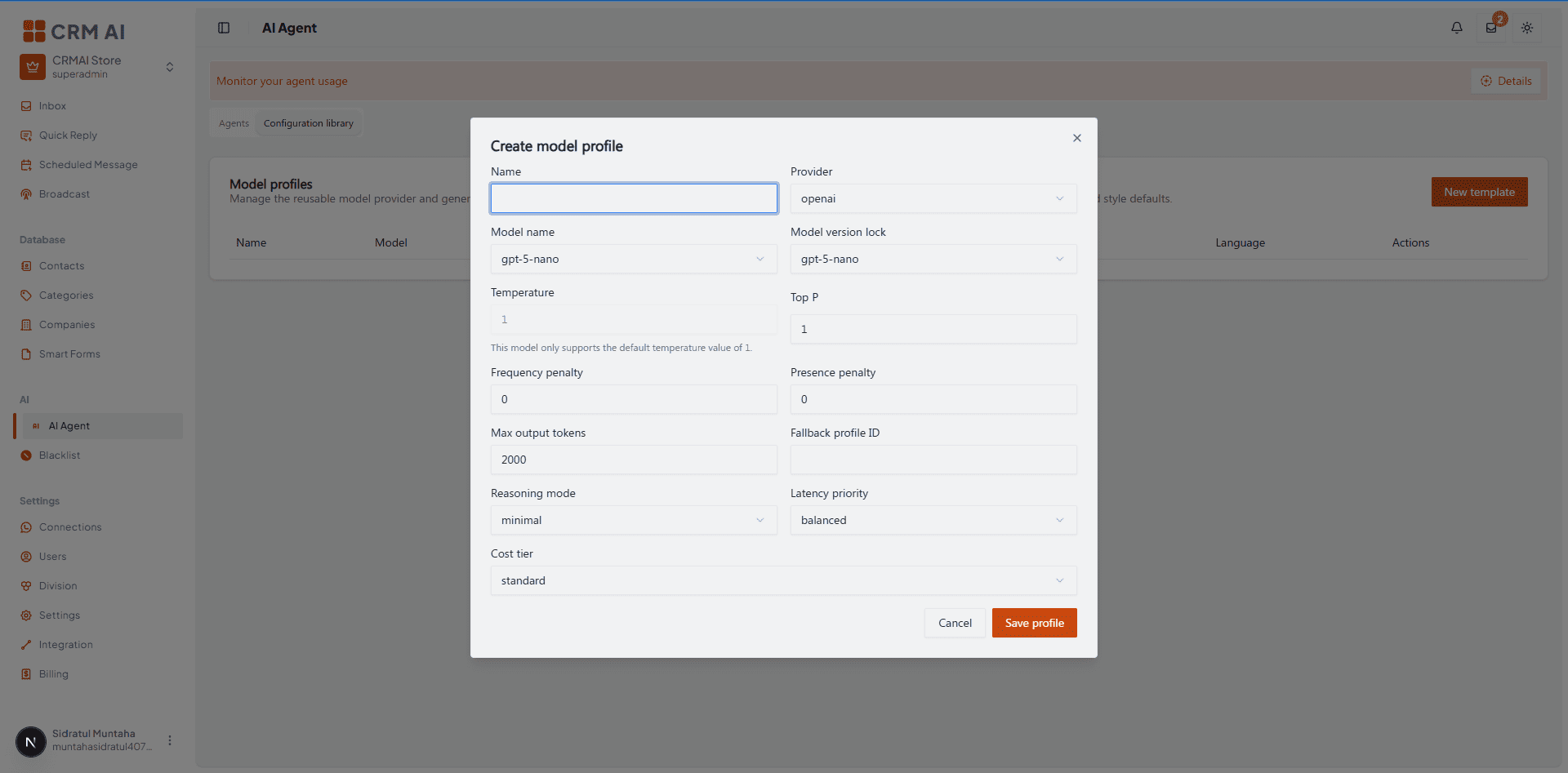
Recommended annotation: group with a bracket + label rather than numbering all 12 fields individually (too dense for arrows): "① Identity" over Name/Provider/Model name/Model version lock, "② Generation tuning" over Temperature/Top P/Frequency/Presence penalty, "③ Limits & fallback" over Max output tokens/Fallback profile ID, "④ Behavior" over Reasoning mode/Latency priority/Cost tier. This grouping pattern is more useful here than sequential numbers since the form isn't filled in a strict linear order.
Note: Max output tokens here is a per-profile ceiling. It's separate from the Authority Limit Level cap (level × 1000) set per agent in Governance — the two are not the same setting, and the agent is bound by whichever is more restrictive in practice.
Creating a Configuration Template
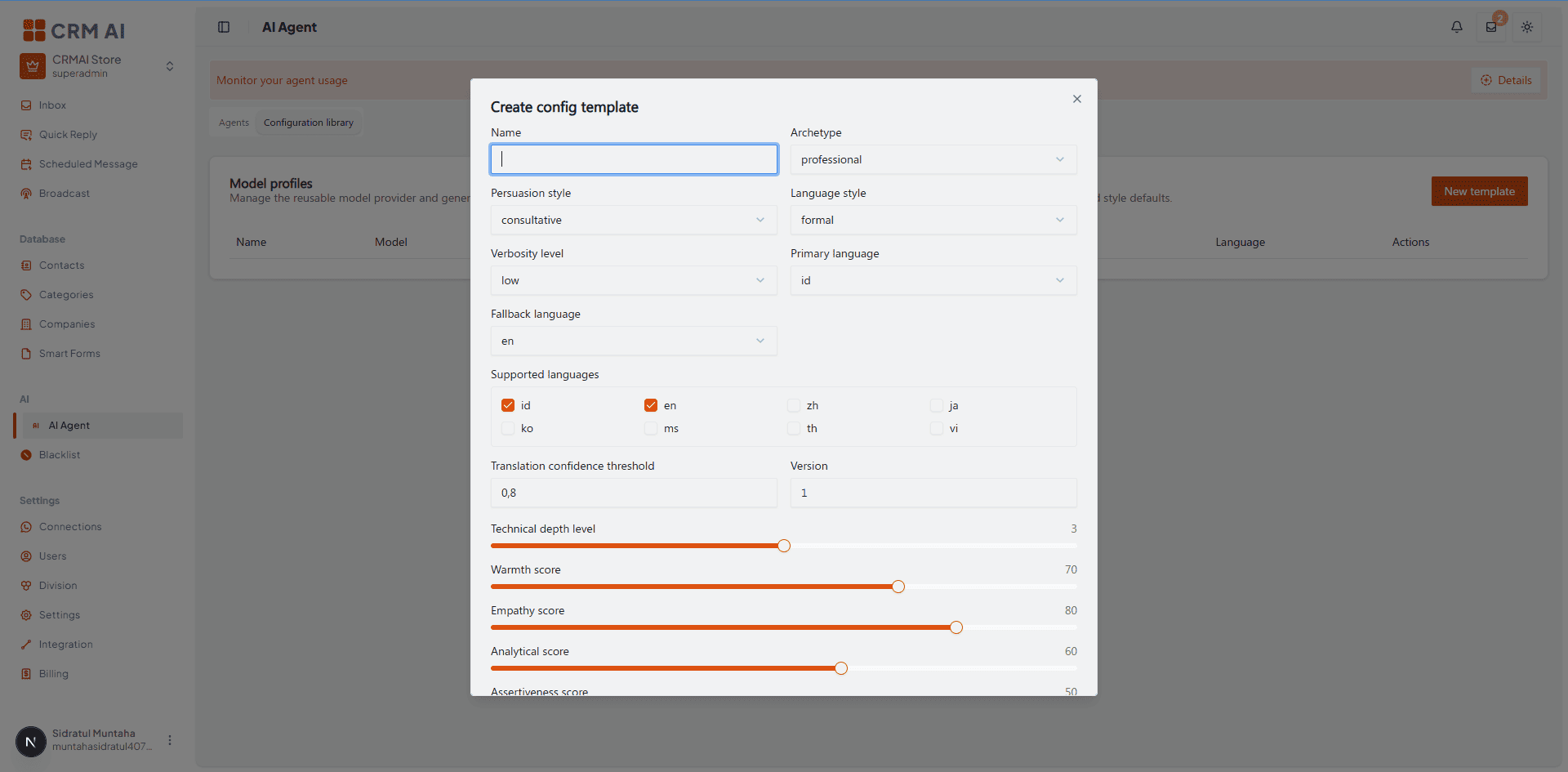
Click New template to open Create config template:
Field | Description | Example shown |
|---|---|---|
Name | Template display name. | — |
Archetype | The agent's overall persona archetype. |
|
Persuasion style | How the agent argues/persuades. |
|
Language style | Formality of language. |
|
Verbosity level | How much detail responses include by default. |
|
Primary language | The template's main response language. |
|
Fallback language | Used if the primary language can't be applied. |
|
Supported languages | Checkboxes: |
|
Translation confidence threshold | Minimum confidence (0–1) before auto-translating. |
|
Version | Template version number. |
|
Technical depth level | Slider — how technical responses can get. |
|
Warmth score | Slider — baseline warmth in tone. |
|
Empathy score | Slider — baseline empathy in tone. |
|
Analytical score | Slider — how analytical/data-driven responses are. |
|
Assertiveness score | Slider — how assertive/directive responses are. |
|
Adaptability score | Slider — how much the agent adjusts its style to match the customer's tone. |
|
Active voice required | Toggle — require active voice over passive voice in responses. | On |
Allow emoji | Toggle — allow emoji use in responses. | On |
Avoid repetition | Toggle — actively avoid repeating phrasing across a conversation. | On |
Avoid metaphor | Toggle — actively avoid figurative language. | Off |
Avoid marketing exaggeration | Toggle — actively avoid hype/exaggerated claims. | On |
Allow auto detect | Toggle — allow the agent to auto-detect the customer's language rather than strictly using Primary language. | On |
Selecting a profile and template for an agent
Inside an individual agent's AI Configuration, open the Configuration (Template) tab to select which Model Profile and Configuration Template that agent uses — see AI Agent for the tab overview.
Note: despite the name, Configuration Template sets the agent's global personality/tone baseline (archetype, language style, warmth/empathy/analytical/assertiveness scores) — the agent-specific system prompt on top of that baseline is written separately in the Behaviour tab.
Operational guidance
Create a small number of well-tuned Model Profiles (e.g., one "fast/cheap" and one "high-quality") and Config Templates (e.g., one per archetype your business needs — professional, friendly, casual) rather than a unique profile per agent — this keeps behavior predictable and easy to audit.
Frequency penalty, Presence penalty, and Top P are advanced generation controls — leave them at default unless you have a specific tuning reason, since small changes here can noticeably shift response quality.
The Warmth, Empathy, Analytical, and Assertiveness scores in a Config Template set the baseline personality — use Emotion Matrix rules on individual agents for situational adjustments (e.g., extra warmth specifically when a customer is angry) rather than trying to encode every scenario into the template itself.
Set a realistic Translation confidence threshold — too low risks mistranslated responses going to customers; too high may cause the agent to fall back to the fallback language more often than needed.
The style toggles (Active voice required, Avoid repetition, Avoid metaphor, Avoid marketing exaggeration) are useful guardrails for a professional/support-oriented archetype — turn Avoid marketing exaggeration on for any customer-support-facing template to keep the agent from overpromising.
Allow auto detect lets the agent respond in whatever language the customer writes in, even if it differs from Primary language — turn this off if you need strict language consistency (e.g., a template meant only for an Indonesian-speaking support line).
A high Adaptability score makes the agent mirror the customer's tone more — pair this thoughtfully with Emotion Matrix rules, since both mechanisms adjust tone and could compound in unexpected ways if tuned too aggressively together.
Related: Behaviour: Agent Personality · Governance & Autonomy · Emotion Matrix