 CRMAI Docs
Override Config
Purpose
Lets you override, at the individual agent level, settings that would otherwise be inherited from the agent's Configuration Template. This tab contains three toggle-gated sections, all off by default.
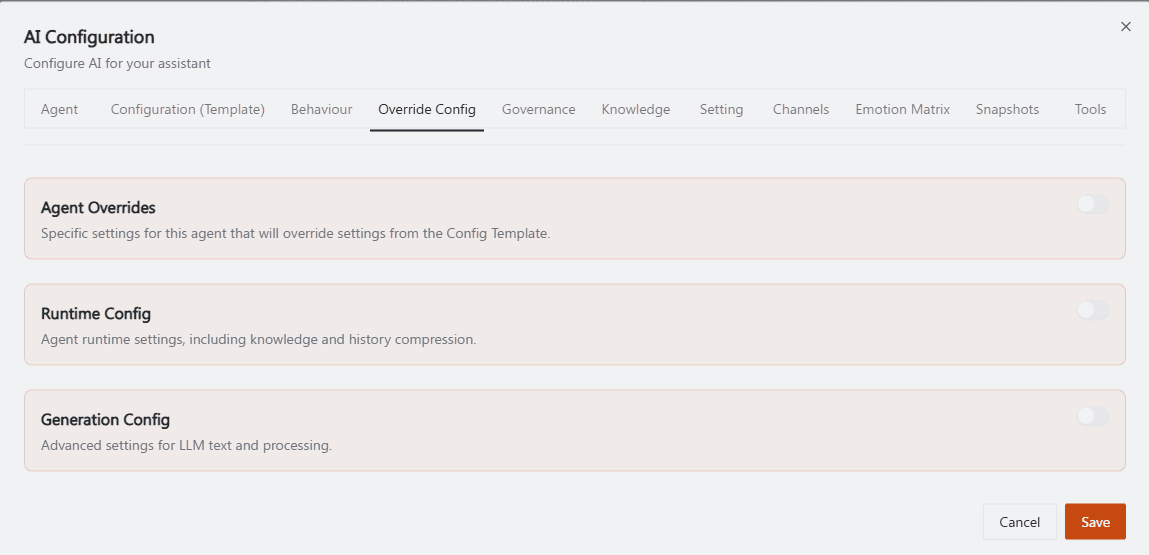
Recommended annotation: since this likely needs 2 stacked screenshots to fit all three sections, label each section header with a colored tab: 🟠 "Agent Overrides", 🟡 "Runtime Config", 🟢 "Generation Config" — matching the H2 headings below so readers can jump straight to the right screenshot region. Within Agent Overrides, circle the master toggle top-right to emphasize it must be on for the fields below to matter.
Agent Overrides
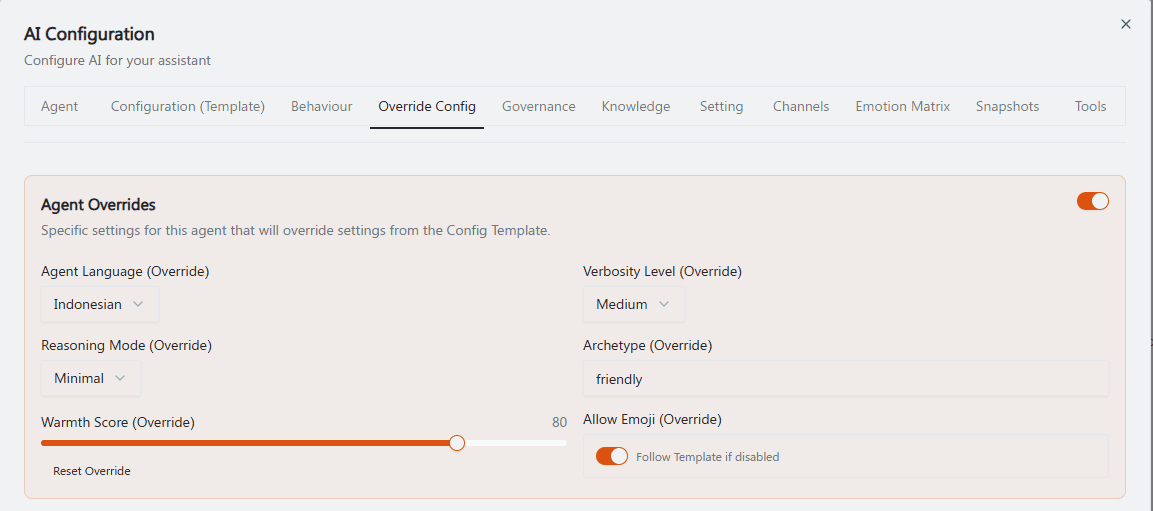
"Specific settings for this agent that will override settings from the Config Template."
Field | Description | Example shown |
|---|---|---|
Agent Language (Override) | Overrides the template's Primary language for this agent specifically. |
|
Verbosity Level (Override) | Overrides the template's Verbosity level. |
|
Reasoning Mode (Override) | Overrides the template's Reasoning mode. |
|
Archetype (Override) | Overrides the template's Archetype (free text here, vs. a dropdown in the template itself). |
|
Warmth Score (Override) | Slider — overrides the template's Warmth score for this agent. Includes a Reset Override link to revert to the template's value. |
|
Allow Emoji (Override) | Toggle. When disabled, the label reads "Follow Template if disabled" — meaning turning this off doesn't force emojis off, it just defers to whatever the Config Template says. | On |
Only the fields shown here can be overridden per agent; other template fields (Persuasion style, Empathy/Analytical/Assertiveness/Adaptability scores, the style toggles like Avoid repetition, etc.) are not exposed for per-agent override and always follow the selected Config Template.
Runtime Config
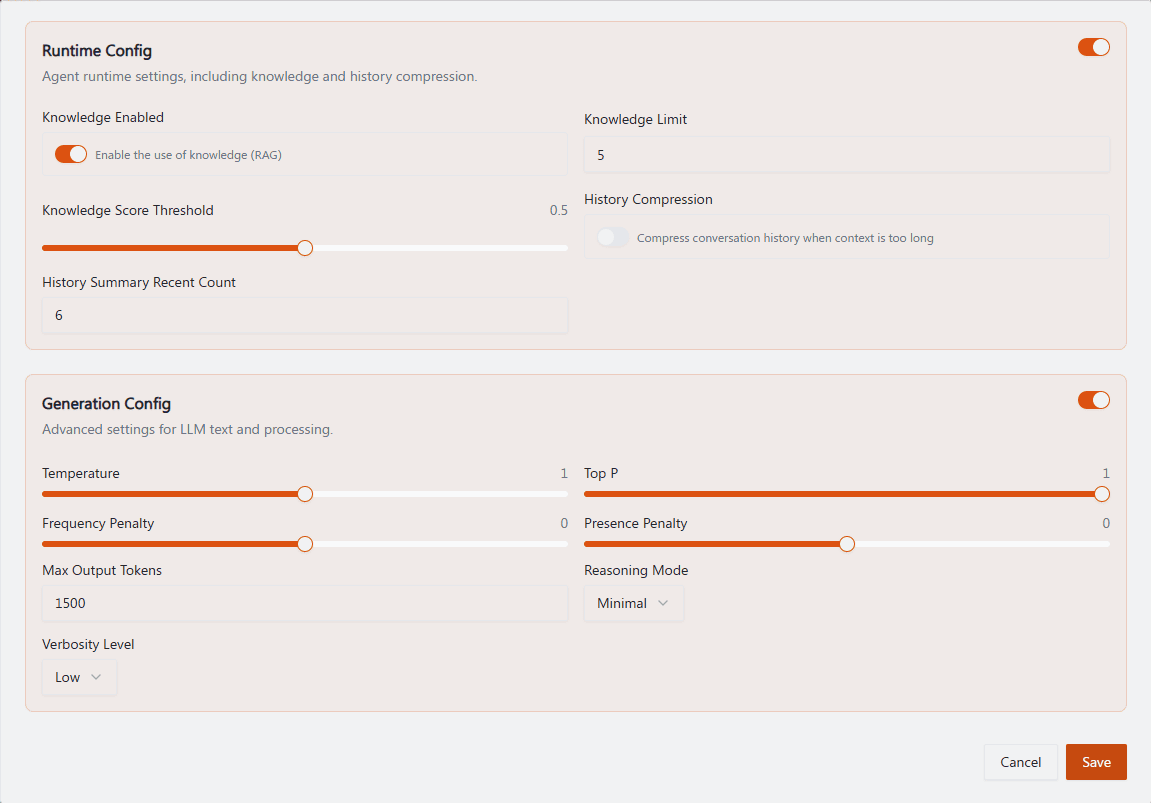
"Agent runtime settings, including knowledge and history compression."
Field | Description | Example shown |
|---|---|---|
Knowledge Enabled | Toggle — "Enable the use of knowledge (RAG)." Controls whether this agent retrieves from its Knowledge Base at all. | On |
Knowledge Limit | How many knowledge chunks/documents are retrieved per query. |
|
Knowledge Score Threshold | Slider (0–1) — minimum relevance score a knowledge chunk needs to be used. |
|
History Compression | Toggle — "Compress conversation history when context is too long." | Off |
History Summary Recent Count | How many of the most recent messages are kept in full detail (uncompressed) even when compression is active. |
|
If Knowledge Enabled is off, the agent ignores everything configured in the Knowledge tab regardless of how many documents or sitemaps are synced there.
Generation Config
"Advanced settings for LLM text and processing." These override the values set in the agent's selected Model Profile.
Field | Description | Example shown |
|---|---|---|
Temperature | Response randomness. |
|
Top P | Nucleus sampling parameter. |
|
Frequency Penalty | Reduces repetition of the same tokens. |
|
Presence Penalty | Encourages introducing new topics. |
|
Max Output Tokens | Per-agent response length cap. |
|
Reasoning Mode | Overrides the Model Profile's reasoning mode for this agent. |
|
Verbosity Level | Overrides verbosity for generation specifically (distinct from Agent Overrides' Verbosity Level above — this one lives under Generation Config). |
|
Note the overlap: Verbosity Level and Reasoning Mode appear in both Agent Overrides and Generation Config. In practice, treat Agent Overrides' version as the persona-level setting (affects tone/style) and Generation Config's version as the model-level generation parameter — if you set them differently, test which one actually wins to avoid confusing behavior.
Operational guidance
Leave all three sections off unless you have a specific reason to diverge from the shared Model Profile / Configuration Template — that's what those exist for, to keep behavior consistent across agents.
Max Output Tokens here (per-agent, via Generation Config) is a third place response length can be capped, alongside the Model Profile's own Max output tokens and the Governance Authority Limit Level (level × 1000). Whichever is smallest wins in practice — check all three if a response seems unexpectedly cut short.
Turn on Knowledge Enabled deliberately — if an agent doesn't need to reference your Knowledge Base, leaving this off can reduce latency and irrelevant retrieved context.
Use Reset Override liberally when testing — it's a fast way to confirm whether a behavior change came from your override or from the underlying template.
Document why you enabled an override somewhere your team can see (e.g., in the agent's Agent Tasks & Role field), since overrides can make an agent's behavior diverge silently from what the template suggests. Review Snapshots after enabling an override to confirm exactly what changed.
Related: Model Profiles & Configuration Templates · Governance & Autonomy · Knowledge Base · Snapshots