 CRMAI Docs
設定とエスカレーション
目的
Settingタブでは、日々の会話におけるエージェントの振る舞いに関する運用トグルと、会話を人間に引き渡すための完全なEscalation設定セクションを扱います。
動作トグル
設定 | 説明 |
|---|---|
Typing Simulation | 有効にすると、エージェントが応答する前に「入力中」インジケーターが表示されます。 |
Passive Mode | 有効にすると、AI Agentはタイムアウト後にマニュアル応答が検出されなかった場合にのみ返信します。 |
Group Chat Replies | 有効にすると、AI AgentはWhatsAppグループ内のメッセージに返信します。 |
Stop reply if manual CS responds | 有効にすると、マニュアルCSが返信した後、AI Agentはその番号からの返信を無視します — AIが人間のエージェントと重複して発言することを防ぎます。 |
Multi-bubble | 有効にすると、長い応答が複数の別々のメッセージバブルに分割されます。 |
Conversation History Reading | スライダー、10〜50。AI Agentが読み取る履歴の最大の長さ。 |
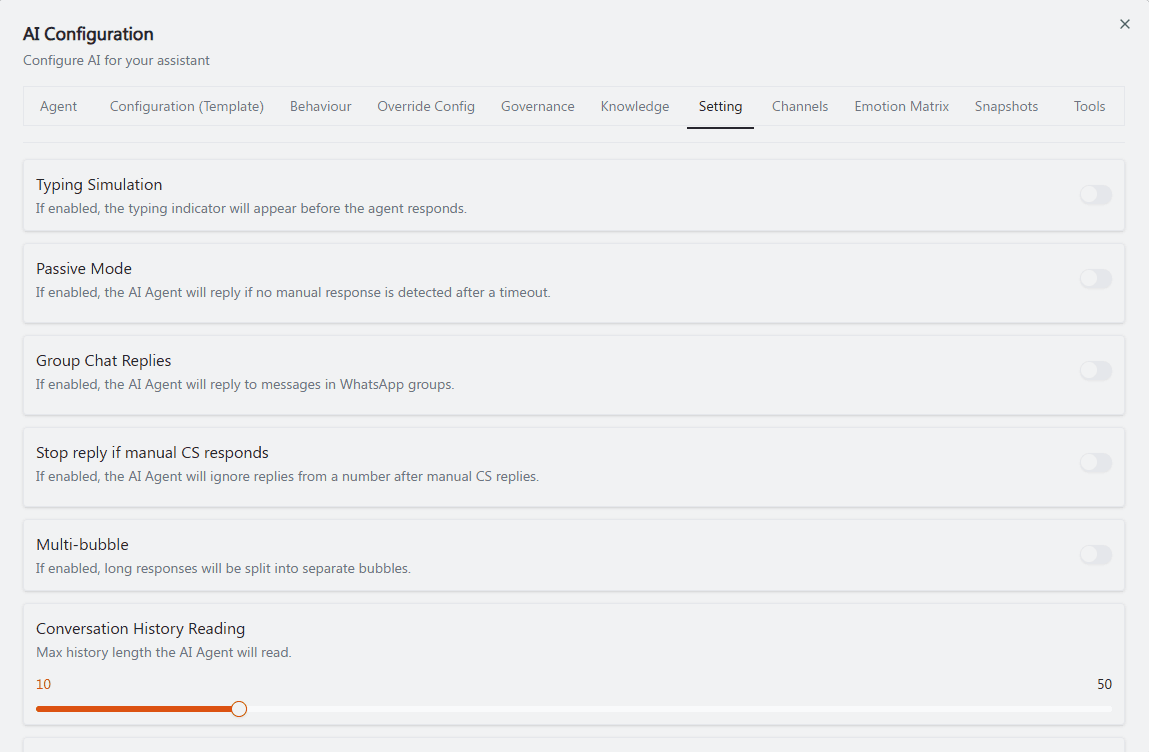
推奨アノテーション: ①〜⑤上記の表の順序に厳密に従って、各トグルに上から下へ番号を付ける。⑥下部にあるConversation History Readingスライダーを枠で囲む。これら6項目の間には他に論理的なグルーピングがないため、番号付けは厳密に上から下への順序を維持する。
Escalation
"Configure human handoff and confidence-based escalation."
Handoff prompt — "Prompt used when the AI needs to hand the conversation off." 自由テキスト:"Describe when and how the AI should hand off the conversation."
Escalation recipients — "Select one or more customer identities to receive escalation notifications." + Add recipientを使ってリストを作成します。
Human handoff(トグル) — "Enable human handoff when the user needs to be connected to a human."
Confidence escalation(トグル) — "Enable human escalation when the AI confidence is below the threshold."
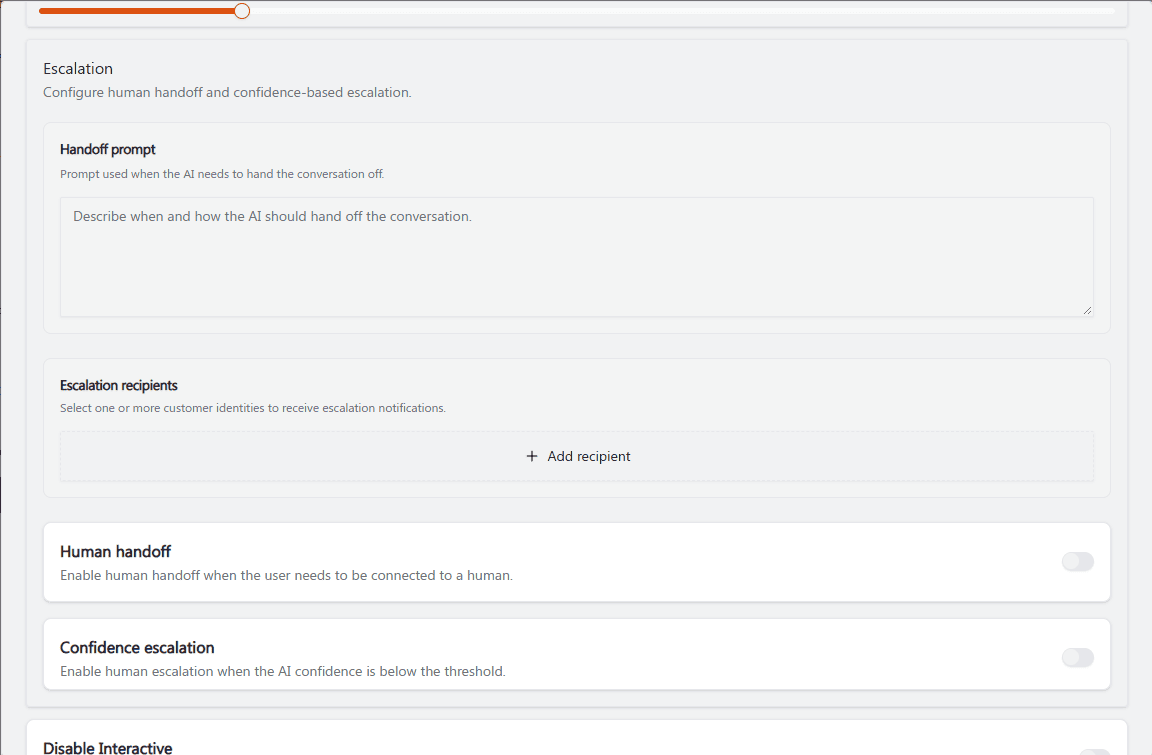
推奨アノテーション: ①例のテキストが入力されたHandoff promptのテキストエリアを枠で囲む。②+ Add recipientへの矢印。③④下部の2つのトグル(Human handoff、Confidence escalation)に番号を付ける — これら2つは混同しやすいため、「③人間につながる」対「④AIの確信度が低い場合にトリガーされる」という並列の括弧書きで区別しやすくする。
その他のエスカレーション関連トグル
Disable Interactive — "By default, the AI will try to send interactive messages. Turn this on to disable interactive responses." 詳細はInteractive Messageを参照してください。
Allow Smart Form Tool — "By default, the AI cannot access published Smart Forms. Turn this on to let the AI use published Smart Forms." 詳細はSmartFormsを参照してください。
Opening Hours — "If enabled, the AI Agent will automatically activate during business hours."
Follow Up — "When enabled, the agent will automatically perform follow-up actions based on the defined conditions and events."
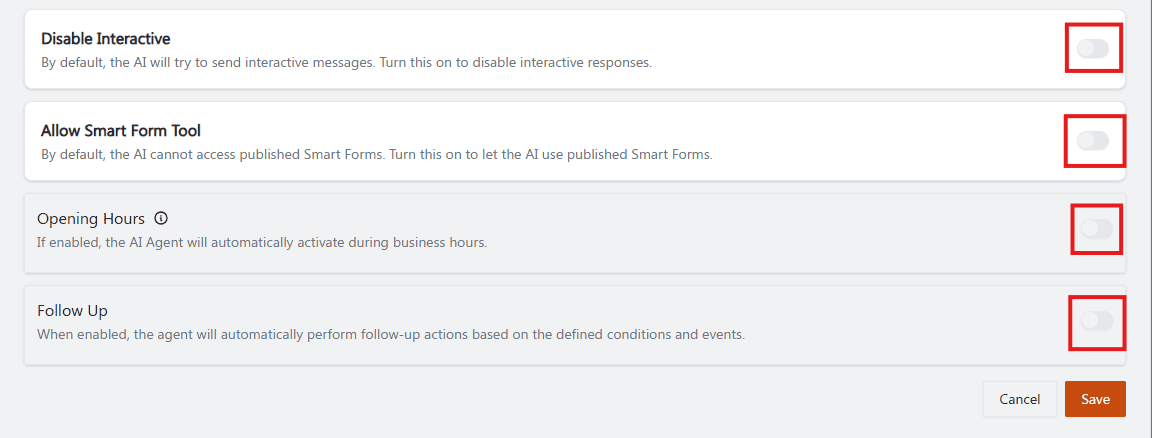
推奨アノテーション: ①②③④4つのトグルに上から下へ番号を付け、①Disable Interactiveの隣には「⚠️ 論理が反転している — ONはinteractiveがOFFであることを意味する」という小さな注記を直接追加する。この二重否定の命名は、このページで最も混乱を招きやすい点であるため。
運用ガイダンス
Human handoffが現在オフであっても、明確なHandoff promptを記述してください — これには何もコストがかからず、後で有効にする際にスムーズになります。
センシティブなトピックを扱うすべてのエージェントについて、Confidence escalationを保守的なGovernance Autonomy Levelと組み合わせてください。
Shared Inboxで人間のオペレーターと並行して作業するすべてのエージェントについて、Stop reply if manual CS respondsを有効にしてください — これにより、AIと人間のエージェントが同じ顧客に同時に返信することを防げます。
エージェントの役割が実際に顧客から構造化されたデータを収集することを含む場合にのみ、Allow Smart Form Toolを有効にしてください。
関連項目: Behaviour: Agent Personality · Governance & Autonomy · SmartForms (リンク未提供) · Interactive Message