 CRMAI Docs
설정 및 에스컬레이션
목적
Setting 탭은 일상적인 대화에서 에이전트가 어떻게 동작하는지에 대한 운영 토글과, 대화를 사람에게 넘기기 위한 완전한 Escalation 설정 섹션을 다룹니다.
동작 토글
설정 | 설명 |
|---|---|
Typing Simulation | 활성화하면, 에이전트가 응답하기 전에 "입력 중" 표시가 나타납니다. |
Passive Mode | 활성화하면, AI Agent는 타임아웃 후 수동 응답이 감지되지 않은 경우에만 답장합니다. |
Group Chat Replies | 활성화하면, AI Agent는 WhatsApp 그룹 내 메시지에 답장합니다. |
Stop reply if manual CS responds | 활성화하면, 수동 CS가 답장한 후 해당 번호로부터의 답장을 AI Agent가 무시합니다 — AI가 사람 상담원과 동시에 응답하는 것을 방지합니다. |
Multi-bubble | 활성화하면, 긴 응답이 여러 개의 별도 메시지 버블로 분할됩니다. |
Conversation History Reading | 슬라이더, 10~50. AI Agent가 읽어들이는 최대 history 길이. |
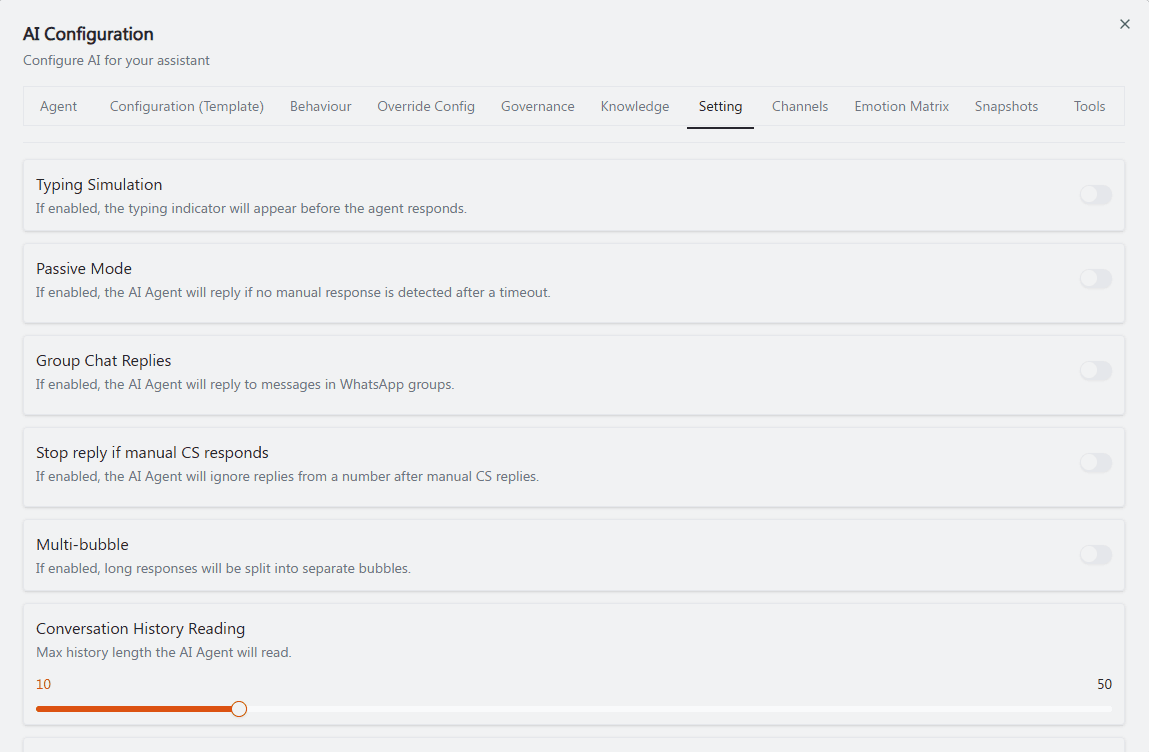
권장 주석: ①~⑤ 위 표의 순서에 맞춰 각 토글에 위에서 아래로 번호를 매기고, ⑥ 하단의 Conversation History Reading 슬라이더를 박스로 표시합니다. 이 여섯 항목 사이에는 다른 논리적 그룹화가 없으므로 번호는 엄격히 위에서 아래 순서를 유지합니다.
Escalation
"Configure human handoff and confidence-based escalation."
Handoff prompt — "Prompt used when the AI needs to hand the conversation off." 자유 텍스트: "Describe when and how the AI should hand off the conversation."
Escalation recipients — "Select one or more customer identities to receive escalation notifications." + Add recipient를 사용하여 목록을 만듭니다.
Human handoff(토글) — "Enable human handoff when the user needs to be connected to a human."
Confidence escalation(토글) — "Enable human escalation when the AI confidence is below the threshold."
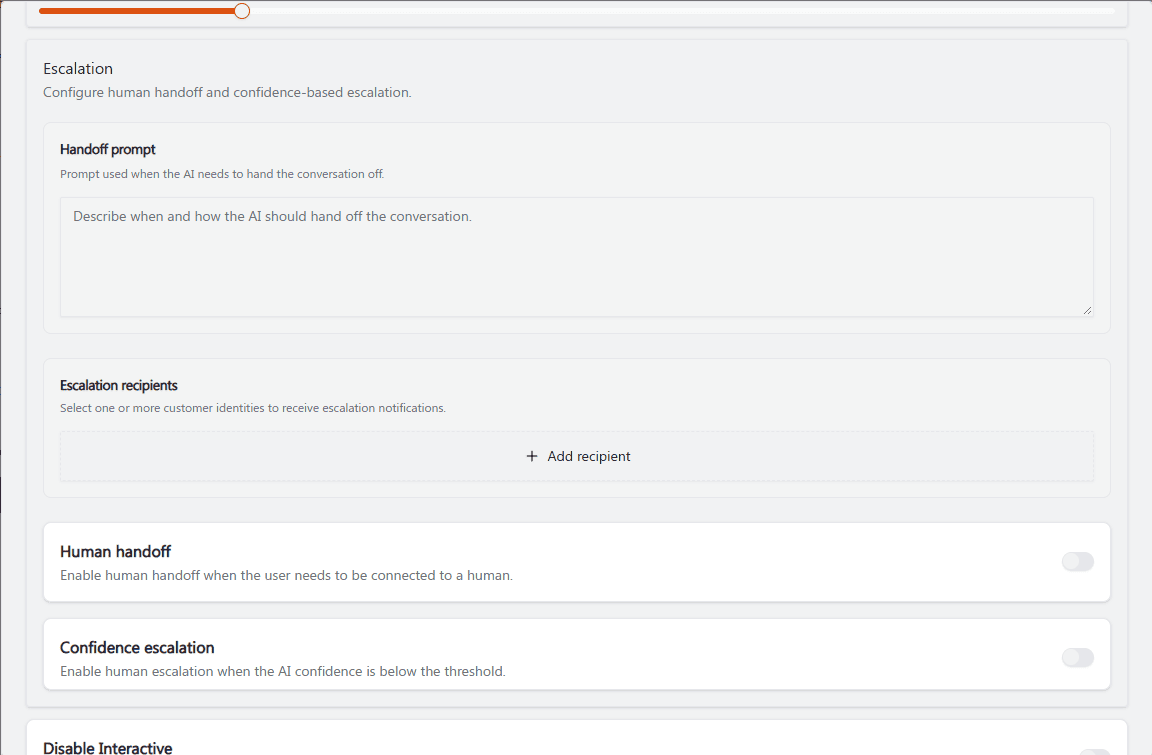
권장 주석: ① 예시 텍스트가 채워진 Handoff prompt 텍스트 영역을 박스로 표시. ② + Add recipient를 가리키는 화살표. ③④ 하단의 두 토글(Human handoff, Confidence escalation)에 번호를 매김 — 이 둘은 혼동하기 쉬우므로, "③ 사람과 연결됨" 대 "④ AI 확신도가 낮을 때 트리거됨"이라고 나란히 괄호로 표시하면 구분하는 데 도움이 됩니다.
기타 에스컬레이션 관련 토글
Disable Interactive — "By default, the AI will try to send interactive messages. Turn this on to disable interactive responses." 자세한 내용은 Interactive Message를 참조하세요.
Allow Smart Form Tool — "By default, the AI cannot access published Smart Forms. Turn this on to let the AI use published Smart Forms." 자세한 내용은 SmartForms를 참조하세요.
Opening Hours — "If enabled, the AI Agent will automatically activate during business hours."
Follow Up — "When enabled, the agent will automatically perform follow-up actions based on the defined conditions and events."
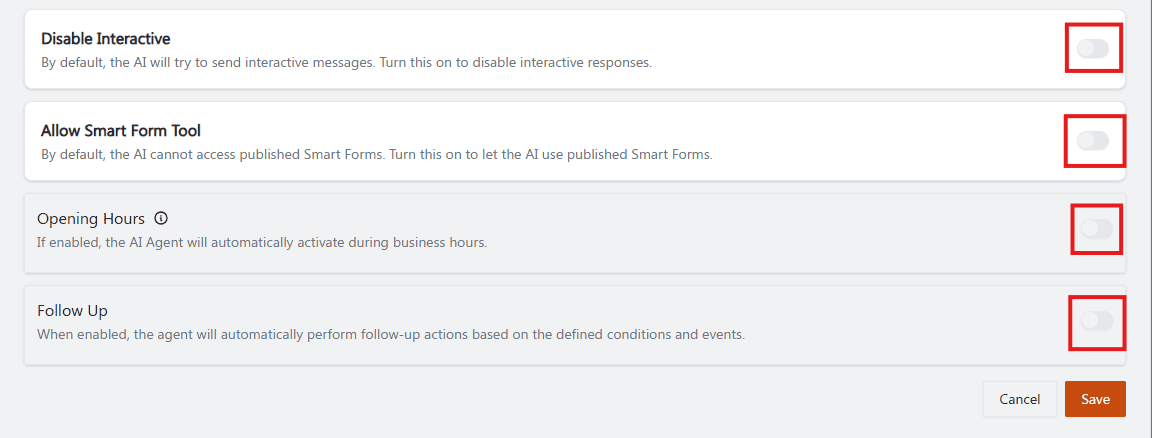
권장 주석: ①②③④ 네 개의 토글에 위에서 아래로 번호를 매기고, ① Disable Interactive 옆에 "⚠️ 반전된 로직 — ON은 interactive가 OFF임을 의미함"이라는 작은 참고를 바로 옆에 추가합니다. 이 이중 부정 명명이 이 페이지에서 가장 혼동을 일으키기 쉬운 지점이기 때문입니다.
운영 가이드
Human handoff가 현재 꺼져 있더라도 명확한 Handoff prompt를 작성하세요 — 이는 비용이 들지 않으며, 나중에 활성화할 때 수월하게 만들어 줍니다.
민감한 주제를 다루는 모든 에이전트에 대해 Confidence escalation을 보수적인 Governance Autonomy Level과 함께 사용하세요.
Shared Inbox에서 사람 운영자와 함께 작업하는 모든 에이전트에 대해 Stop reply if manual CS responds를 켜세요 — 이는 AI와 사람 상담원이 동시에 같은 고객에게 응답하는 것을 방지합니다.
에이전트의 역할이 실제로 고객으로부터 구조화된 데이터를 수집하는 것을 포함하는 경우에만 Allow Smart Form Tool을 활성화하세요.
관련 항목: Behaviour: Agent Personality · Governance & Autonomy · SmartForms (링크 미제공) · Interactive Message