 CRMAI Docs
User Roles & Permissions
Purpose
Manage user authority on the dashboard using Role-Based Access Control (RBAC). CRMAI uses a role-based access system per workspace — a user's role is determined by their membership in the currently active workspace, and the same person can hold different roles in different workspaces.
Access
Dashboard:
/{locale}/dashboard/users
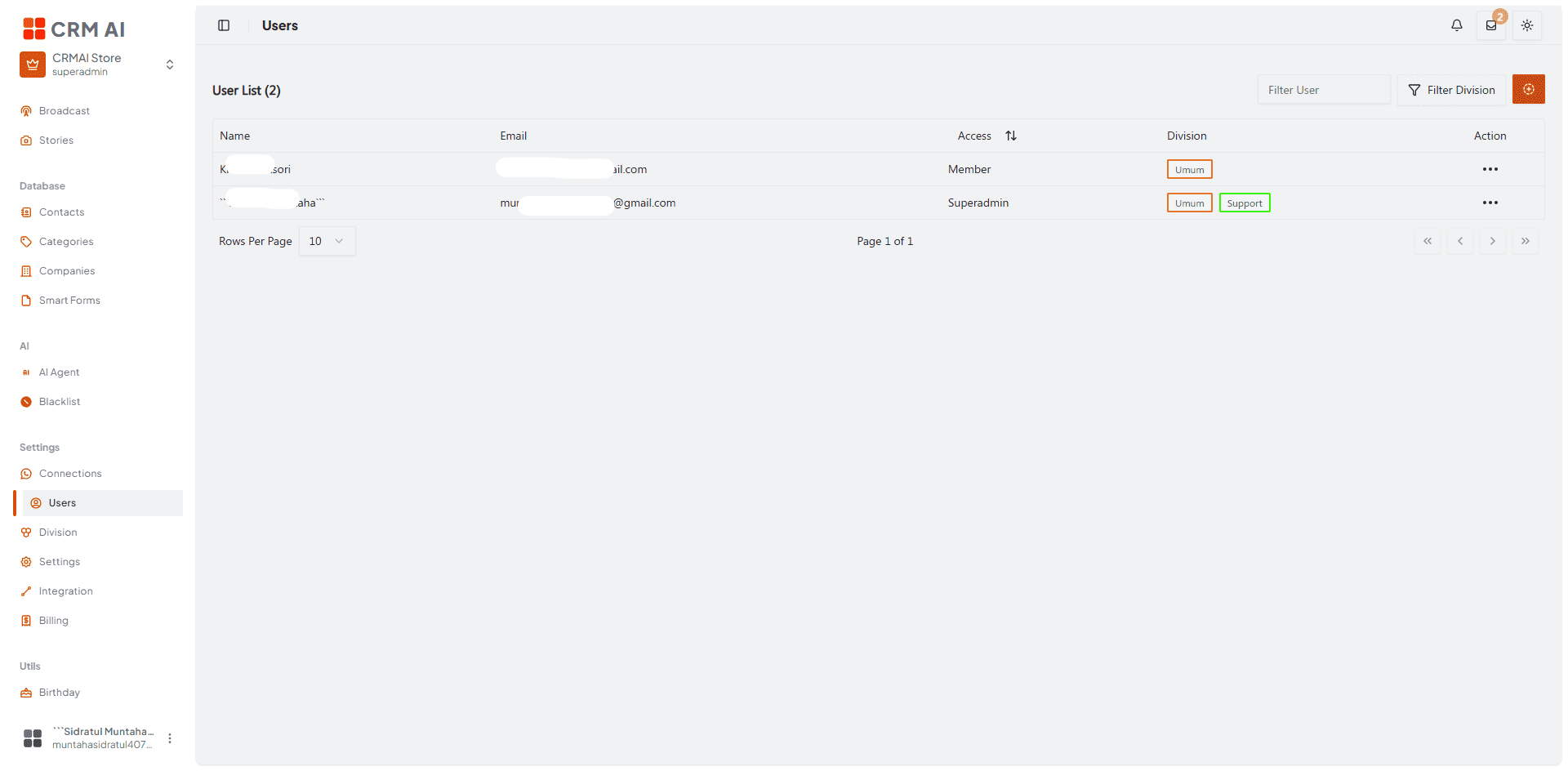
Recommended annotation: ① box the Access column header with its sort arrows. ② box the Division column showing a user with multiple division chips (e.g., a Superadmin assigned to both "Umum" and "Support"). ③ arrow to the ⋯ action menu on a row.
Prerequisite: the user must already have a CRMAI account
⚠️ Important: before an admin can add someone to the workspace via the Users page, that person must already be registered on CRMAI (see Registration, reachable at
/{locale}/login?reg). If the email doesn't match an existing registered account, adding the user fails.If the person doesn't have an account yet, either:
Ask them to register first at
/{locale}/login?reg, then add them once they have an account, orGenerate an invitation code instead and share it with them — this lets them join the workspace themselves during their own registration/onboarding flow. See Invitation Code Management.
How to add a user
Go to the Users menu ➡️ click Add New User (the ⊕ button top-right).

Confirm the person has already registered a CRMAI account (see prerequisite above).
In the Configuration dialog, fill in:
Field | Description | Example shown |
|---|---|---|
Name | The user's display name. |
|
Must match an already-registered account. |
| |
Role | Dropdown — Member, Admin, or Superadmin. |
|
Connection | Dropdown — which channel connection this user is tied to. |
|
Division | Multi-select — shows a count (e.g., Selected 1). | 1 selected |
Click Save.
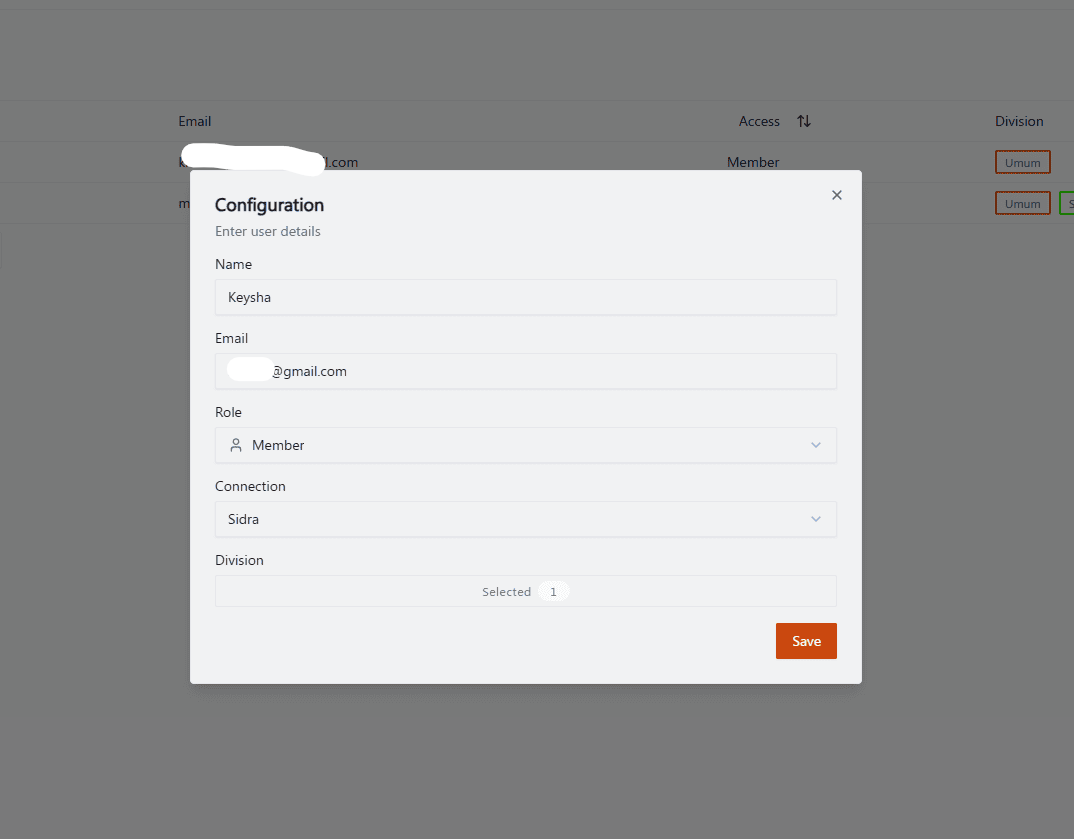
Recommended annotation: ①②③④⑤ number the five fields top to bottom (Name, Email, Role, Connection, Division) matching the table above. ⑥ arrow to Save.
Roles overview
CRMAI has three roles:
Role | Primary focus |
|---|---|
Member | Day-to-day operational work — viewing customers, handling tickets, creating new contacts. |
Admin | Manages nearly all workspace configuration and activity, including connections, AI, broadcast, divisions, and customers. |
Superadmin | Full access to every function in the workspace, including managing users at every level. This is the workspace owner's role. |
⚠️ Architecture note: Superadmin bypasses all RBAC permission checks entirely — it isn't that Superadmin happens to have every permission granted, but that the authorization layer skips permission checks for this role altogether. Keep this in mind for security review: a Superadmin account is a single point of full access, so protect its credentials accordingly.
Access control recommendations
Use Member for regular operators who only need to handle their own tickets and customer records.
Use Admin for supervisors who need to configure connections, AI, divisions, and broadcasts — but remember Admin still can't manage other Admins or Superadmins, only Members.
Reserve Superadmin for the actual workspace owner(s) — this role bypasses every permission check, so treat its credentials with the highest level of care and keep the number of Superadmin accounts minimal.
If an Admin needs to manage another Admin's access (e.g., during offboarding), a Superadmin must perform that action — plan for this in your offboarding process so you're not blocked when an Admin leaves.
Assign users to only the connection(s) and division(s) they need — note the form currently shows Connection as a single-select field but Division as multi-select, so one user can belong to multiple divisions but is tied to one connection at a time.
Prefer invitation codes over manually adding users when onboarding several people at once — see Invitation Code Management.
Related: Division Setup · Registration · Invitation Code Management · Plans, Billing & AI Tokens